Effective inference config
RUNNERS parses each runner's argv: context, batch, flash attention, KV-cache dtype, layer offload, vLLM flags. The only place these are observable — "what was set" next to "what was negotiated".
terminal monitor · Ollama · llama-swap / vLLM · ComfyUI · MIT
See which models are loaded, how much VRAM they eat, what context the runners really negotiated, how far the render has got, and whether the server is healthy — from the SSH session you're already in. Zero flicker, zero dependencies beyond Python 3.10.
$ pipx install ollama-mtop && mtop
or pip install ollama-mtop · uv tool install ollama-mtop · single-file download
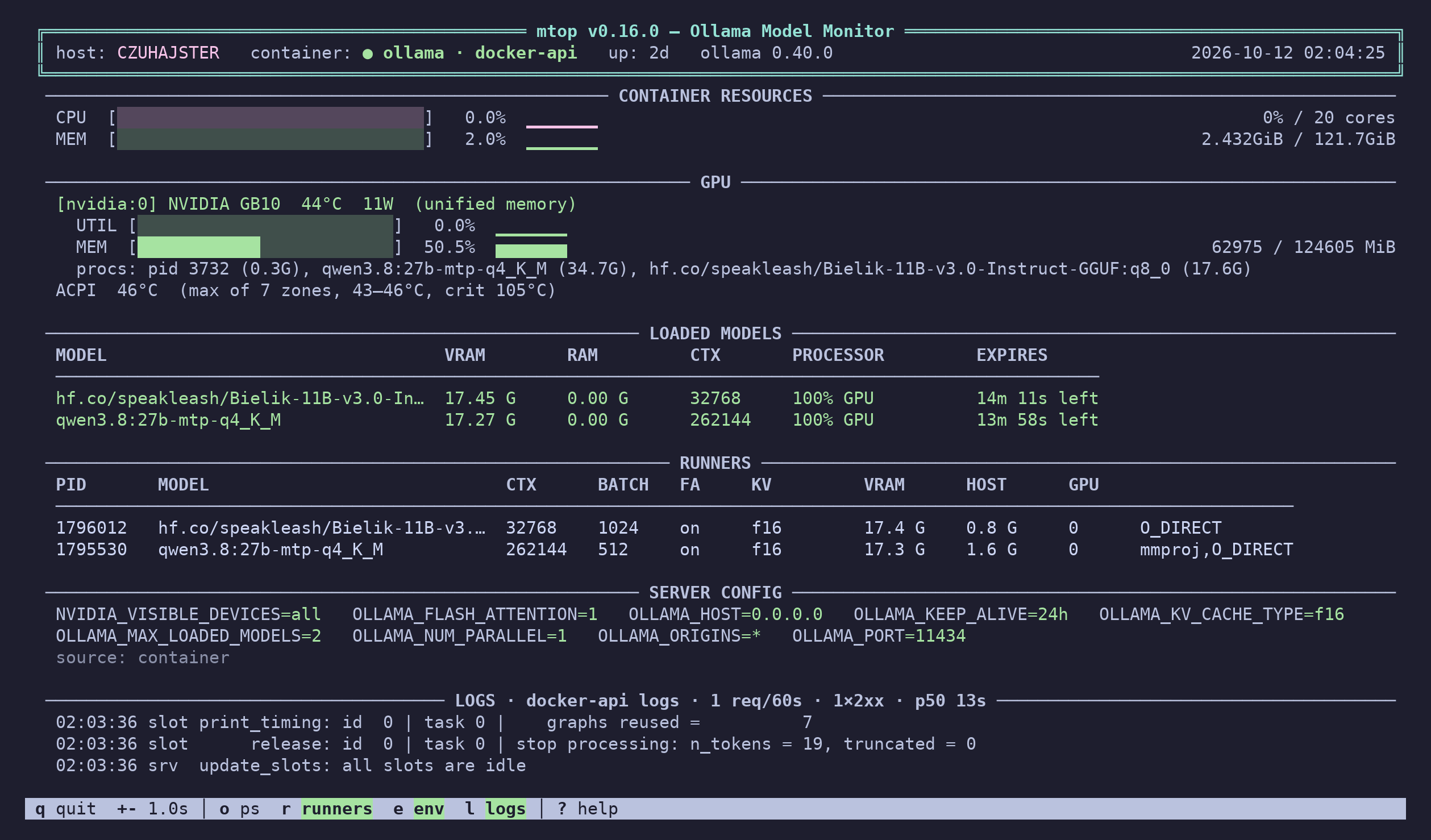
A real session on an NVIDIA DGX Spark (GB10): Ollama in Docker, two models loaded.
There are web dashboards, Prometheus exporters and chat TUIs for local inference. There was no terminal monitor — something you run on a box like htop or nvtop to see what is loaded, where, and with what settings. One command, pure standard library, finds the server on its own — Docker, Podman, systemd or a hand-started process.
RUNNERS parses each runner's argv: context, batch, flash attention, KV-cache dtype, layer offload, vLLM flags. The only place these are observable — "what was set" next to "what was negotiated".
NVIDIA per-process VRAM via NVML (ctypes, no nvidia-smi fork) joined to runner PIDs: a GPU column in RUNNERS and a procs: line under every card.
NVIDIA, AMD (plain amdgpu via sysfs — no ROCm needed), Intel, Apple Silicon, Jetson / Spark unified memory. Utilisation, VRAM/GTT, temperature, power, ACPI thermal zones.
All I/O runs in a background collector thread. The UI stays at 100 ms even when the API hangs; stale data is flagged instead of freezing the screen.
Tail of the container log or journalctl, plus requests/minute, status classes and p50 latency parsed from the access log.
Repeat -u: the local box with full host stats, remotes API-only, one table each. Works behind reverse proxies — bearer tokens, basic auth, private CAs.
--json for cron and Ansible facts (exit 1 when unhealthy), --json --watch for NDJSON, --prometheus for a node_exporter textfile — no port opened.
Talks to the Docker or Podman socket with stdlib http.client; the docker binary is only a fallback. CPU bar is normalised to the container's cgroup limit.
Without --control mtop never writes to the API. Model actions — stop, load, keep, pull, cancel — are opt-in and always ask y/N first.
The same layout — header, resources, GPU, models, runners, config, logs — fed by whichever server you run. --mode auto finds it; --backend picks the kind.
Loaded models with the VRAM/RAM split, context, processor and TTL countdown, the runners' effective config, the server's OLLAMA_* environment, and the GIN access log. Docker, Podman, systemd or a manual ollama serve.
mtopScreenshot above.
The whole configured catalog — loaded or not — with state, upstream port and TTL left. vllm serve flags per runner (context, gpu-util, quant, tp), llama-server and other upstreams too, the user-level systemd unit and its journal.
mtop --backend llama-swap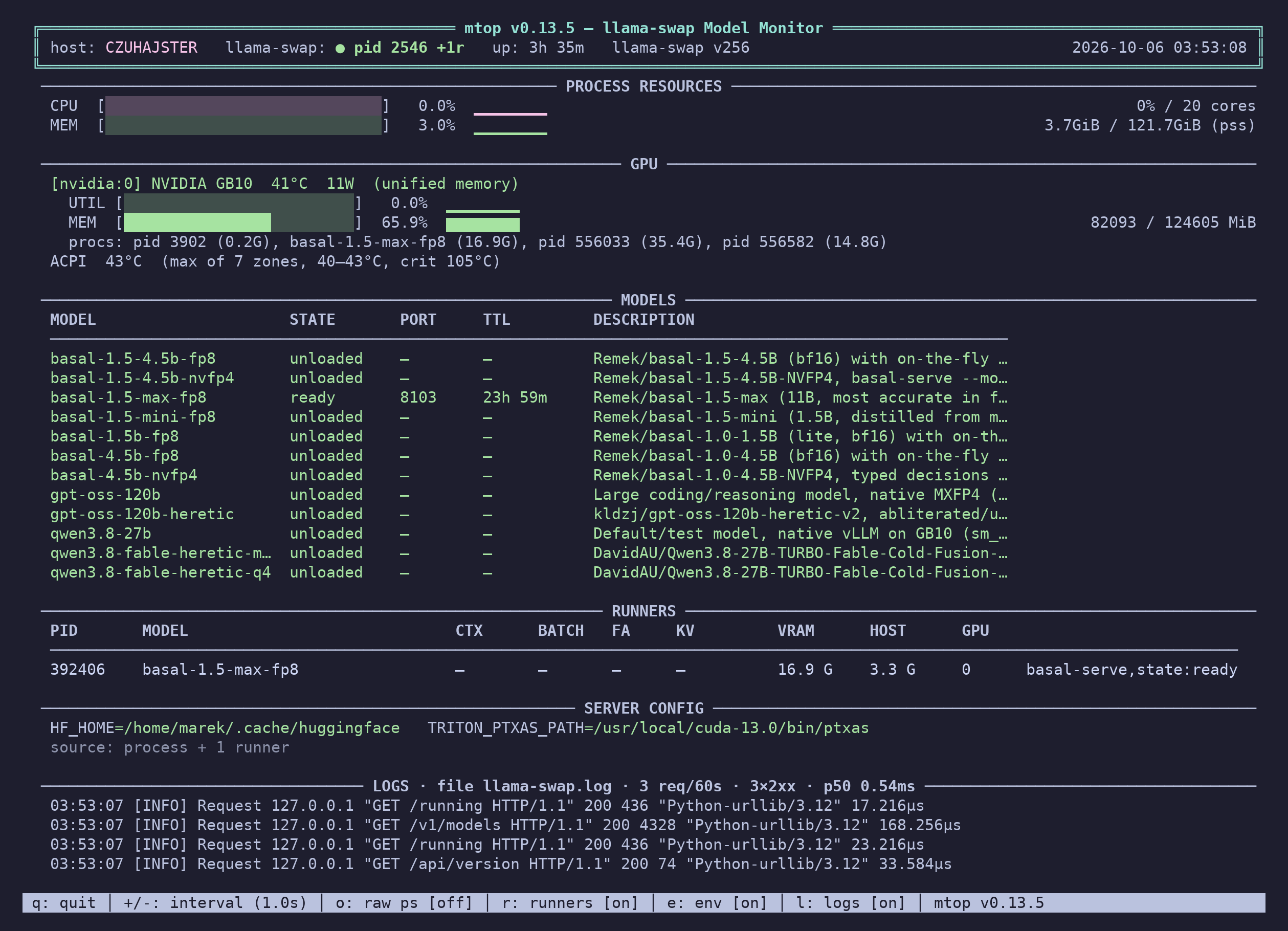
Not a model server, so mtop reads the workflow: the models of the running and recent jobs, live progress — node, step x/y, ETA — from the websocket, the queue, the GPU memory ComfyUI holds, and the /models catalog.
mtop --backend comfyui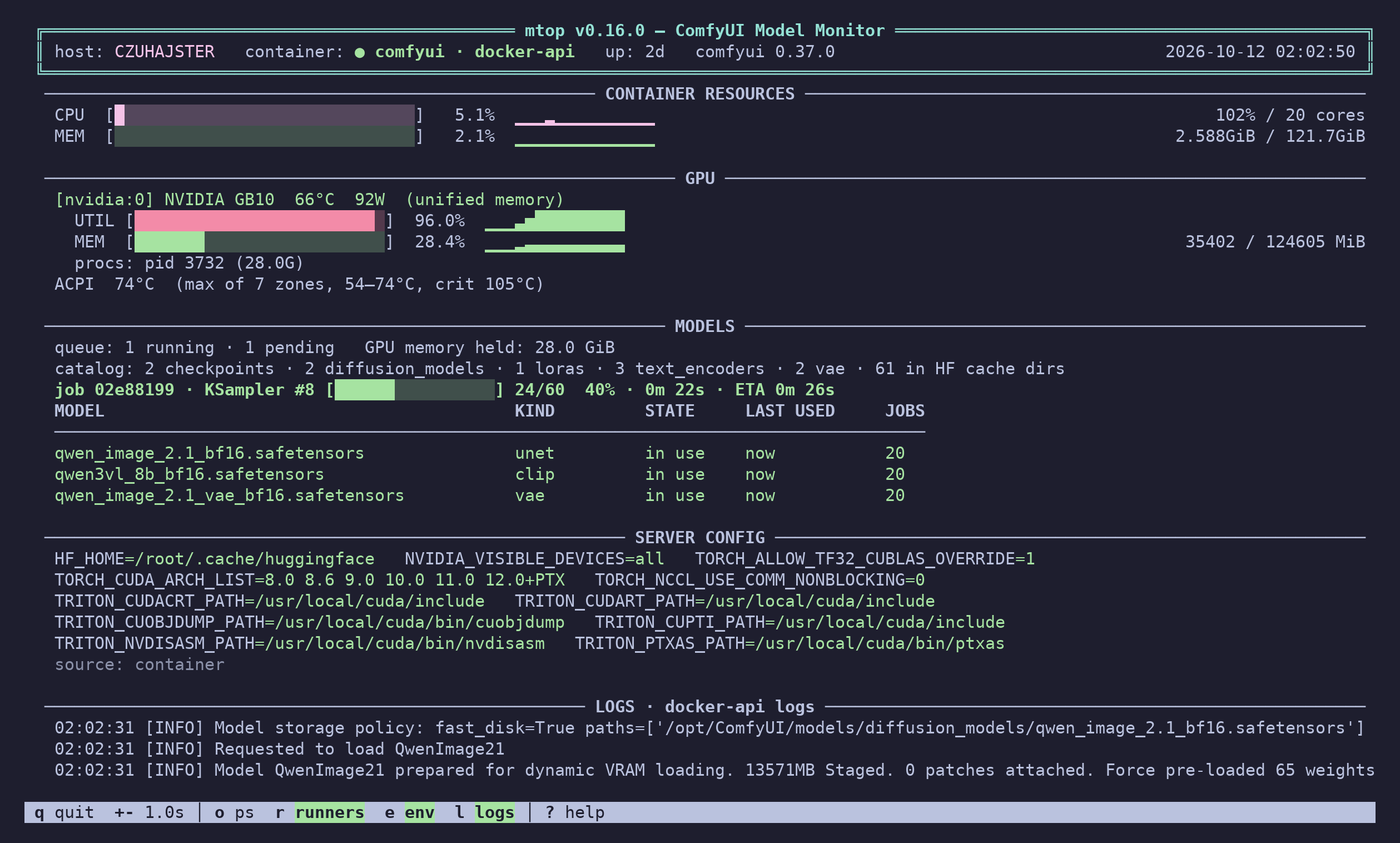
--control turns the monitor into a small console. Arrow keys select a model; s unloads it, t keeps it loaded longer, L loads one, P pulls by name with live bytes, speed and ETA. For ComfyUI: cancel the job, clear the queue, free the models. Every action asks first.

Real time, recorded on a DGX Spark. The asciinema cast is in the repo.
$ pipx install ollama-mtop$ uv tool install ollama-mtop$ pip install ollama-mtop$ curl -fsSL https://github.com/Quaerendir/mtop/releases/latest/download/mtop.py -o mtop.py
$ chmod +x mtop.py && ./mtop.py$ git clone https://github.com/Quaerendir/mtop.git && cd mtop
$ pip install -e . && mtopWith no arguments mtop probes for Docker, then systemd, then a manual process, and honours $OLLAMA_HOST.
# Ollama in a custom container / bare-metal service
mtop -c my-ollama
mtop --mode local

# several instances: local with host stats, two remotes API-only
mtop -u localhost:11434 -u rig=gpu-rig:11434 -u spark=192.168.3.6:11434

# behind a reverse proxy with a private CA and a bearer token
OLLAMA_API_KEY=… mtop -u https://ollama.internal --cacert /etc/ssl/internal-ca.pem

# other backends, and model actions
mtop --backend llama-swap
mtop --backend comfyui --control

# one-shot JSON for scripts, NDJSON stream, Prometheus textfile
mtop --json | jq '.models[].name'
mtop --json --watch -i 1 | jq -c '{t: .wallclock, models: [.models[].name]}'
mtop --prometheus --watch -i 15 -o /var/lib/node_exporter/textfile_collector/mtop.prom| Key | Action |
|---|---|
| q / Esc | Quit |
| ? | All keys and which sections are on |
| + / - | Faster / slower refresh |
| r e l o | Toggle RUNNERS, SERVER CONFIG, LOGS, raw ollama ps |
| ↑ ↓ s t L P | Select, stop, keep, load, pull — with --control |
Full option reference and per-backend details in the README.
| Platform | Status | Notes |
|---|---|---|
| Linux + NVIDIA | full | NVML via ctypes; nvidia-smi as fallback |
| Jetson / Orin / GB10 Spark | full | unified memory via /proc/meminfo |
| Linux + AMD (amdgpu) | full | sysfs, no ROCm needed; APUs report the GTT pool |
| Linux + Intel (Arc / Xe / iGPU) | partial, untested | no utilisation without root |
| macOS (Apple Silicon) | full* | GPU util and memory via ioreg, no root; *temperature/power need powermetrics |
| Docker / Podman / systemd / manual | full | auto-detected, Engine API over the socket |
| WSL2 | partial | needs Docker + nvidia-container-toolkit |
Requires Python 3.10+. Docker/Podman socket access is enough — the CLI is optional. Verified against Ollama, llama-swap + vLLM and ComfyUI on an NVIDIA GB10.